
Child Work Order Configuration Quick Start Guide
We’ve added the ability to configure what fields carry over into new child work orders created from an existing work order edit page! (Note: this does not affect corrective generation created work orders, only manually created child work orders from the portal on the Work Order page.)
Getting to the Configuration Screen
From the main CMS 4 page, click on the “Waffle” button and select the Admin Console. Not all users will have permissions to get into the admin console, so check with your facility administrator if you do not have access and feel that you should.
Under the Work Orders section of the Admin Console, you will now see an option for Child Work Order Config. See below.
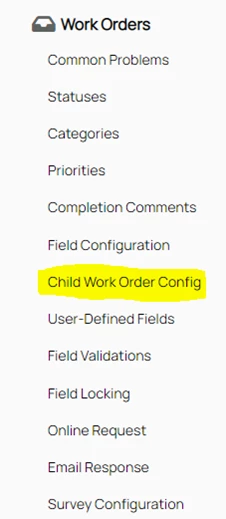
After clicking on the menu link, the configuration page will open.
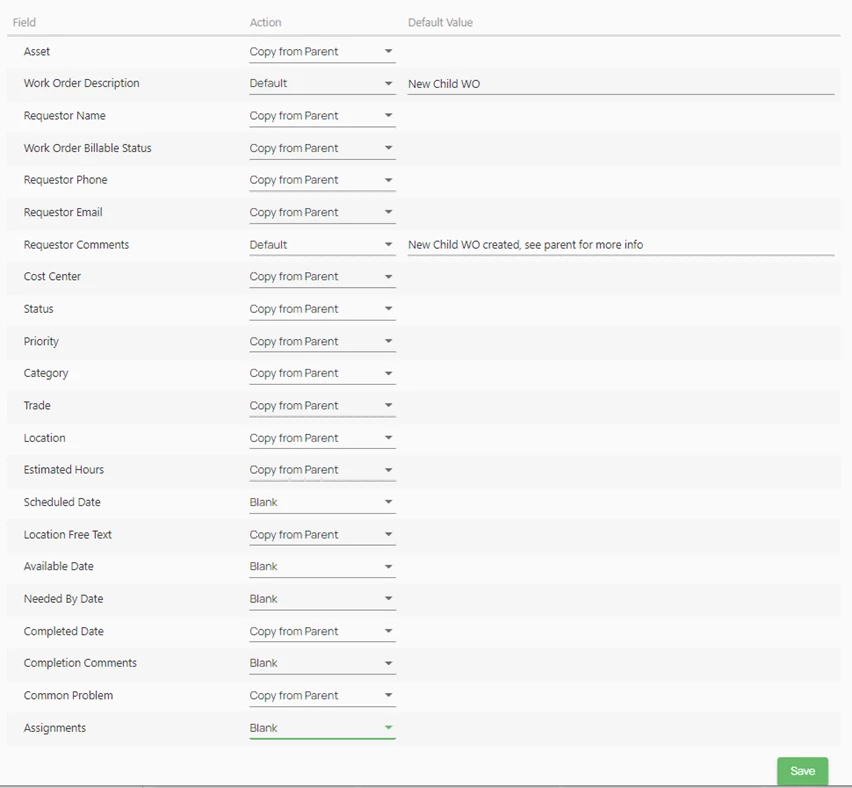
Options for Configuring the Child Work Order
On this screen you have the ability to set work order fields to copy from the parent, be set to blank, or in many cases, set a default value for the child work orders.
When you set the option to Blank, no value will carry over from the parent work order to the child for that field. Setting the option to Copy from Parent will use the parent’s value at the time of the child work order creation in the field on the child. Note: if you subsequently change the value in the parent, it will NOT change the value in the child.
The Default option allows for different things depending on the type of field.
For a text field, you can enter whatever text you would like to include on the child for that field. One example would be to default the Requester Comments to “New Child WO created, see parent for more information.”
For a dropdown field type, you will have the option to select the value from the list that would be available when creating a new work order in that segment.
For a special input type field, like Estimated Hours, where the field expects a numeric value, you can use the arrows or just type in a number to set as the default.
Child Work Order Creation after configuration
If nothing is configured for the child work order configuration, child work orders will continue to use the information from the parent for the majority of fields, except for Requestor Comments and Completion Comments, which will continue to be blank (as they currently are).
After adjusting the settings for the configuration and clicking save, (and a log out and login) new child work orders will be created with the configured fields. To create a new child work order for this process, go into the edit screen of an existing work order and click on the New Child button.

This will create a new, linked child work order using the defaults you set in the configuration. It can then be edited as needed.